World Effectsとは
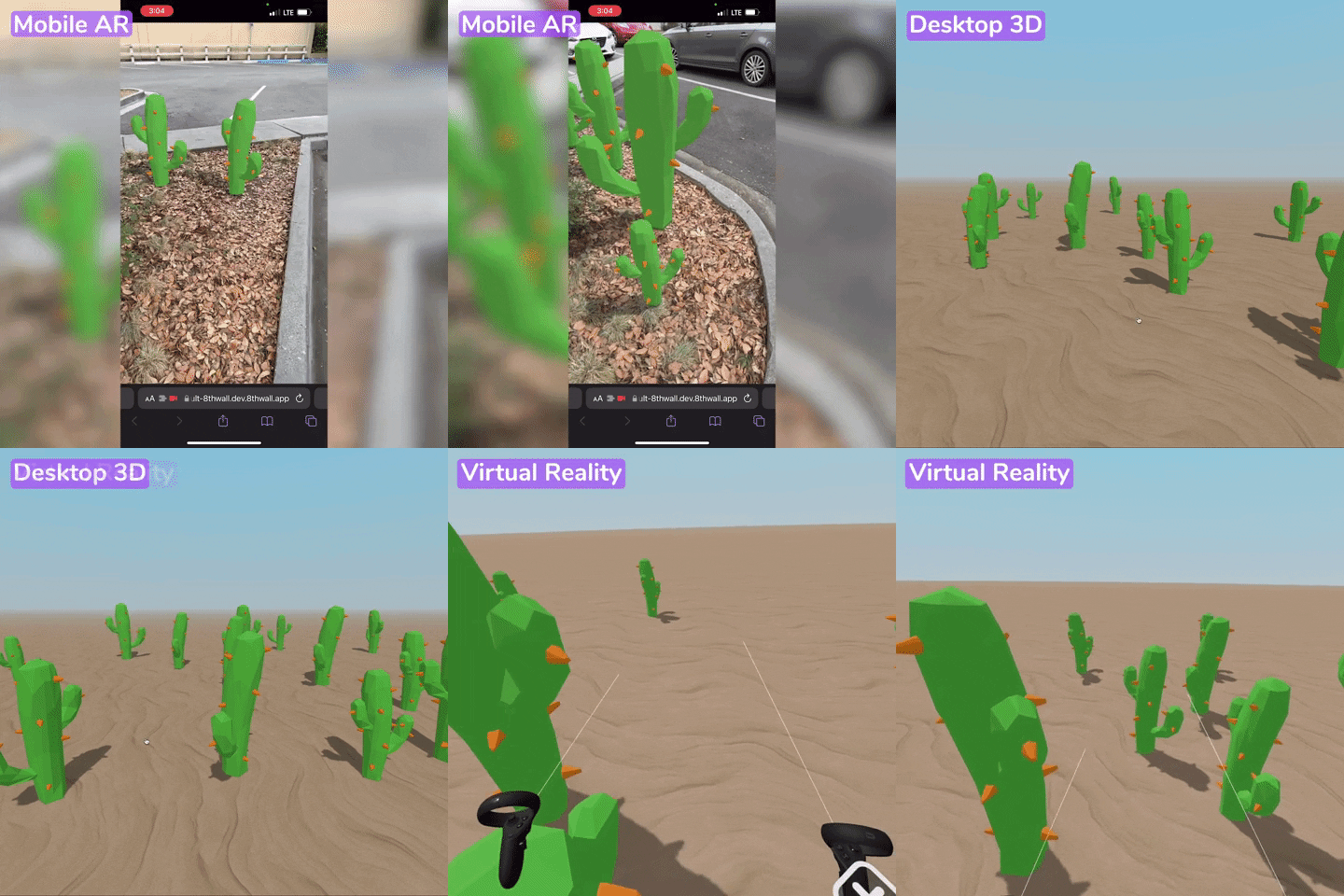
8th WallのWorld Effectsは、SLAMによるワールドトラッキングを活用し、現実の地面や空間に仮想オブジェクトを配置するAR機能です。xrwebコンポーネントのdefaultEnvironment系プロパティで空と地面を構成し、カメラ映像と3Dシーンを統合します。
この記事では、地面をタップしてサボテンを配置するインタラクティブなARデモを例に、World Effectsの基本的な実装パターンを解説します。
※ カメラ対応デバイス(スマートフォン・PC)が必要です。
前提:配布バイナリが必要
World EffectsはSLAM(ワールドトラッキング)に依存するため、OSS版エンジンだけでは動作しません。配布バイナリ(8thwall/engineのxr-standalone.zip)が必要です。
| 機能 | OSS版 | 配布バイナリ |
|---|---|---|
| Face Effects | ○ | ○ |
| Image Targets | ○ | ○ |
| Sky Effects | ○ | ○ |
| World Effects(SLAM) | × | ○ |
プロジェクト構成
project/
├── external/
│   ├── scripts/8frame-1.5.0.min.js   # A-Frame
│   ├── xr/xr.js                       # 8th Wall エンジン
│   ├── xrextras/xrextras.js           # ユーティリティ
│   └── landing-page/landing-page.js    # デバイス判定UI
├── src/
│   ├── index.html                      # エントリーポイント
│   ├── app.js                          # コンポーネント登録
│   ├── tap-place.js                    # タップ配置ロジック
│   ├── index.css                       # オーバーレイスタイル
│   └── assets/
│       ├── cactus.glb                  # 3Dモデル
│       └── sand.jpg                    # 地面テクスチャ
└── config/webpack.config.js            # ビルド設定
シーンの構築
スクリプトの読み込み
<script src="./external/scripts/8frame-1.5.0.min.js"></script>
<script src="./external/xrextras/xrextras.js"></script>
<script src="./external/landing-page/landing-page.js"></script>
<script async src="./external/xr/xr.js" data-preload-chunks="slam"></script>data-preload-chunks="slam"でSLAMチャンクを事前ロードします。World Effectsにはこの指定が必須です。
A-Frameシーンの定義
<a-scene
  tap-place
  landing-page
  xrextras-loading
  xrextras-runtime-error
  renderer="colorManagement:true"
  xrweb="
    allowedDevices: any;
    defaultEnvironmentFogIntensity: 0.5;
    defaultEnvironmentFloorTexture: #groundTex;
    defaultEnvironmentFloorColor: #FFF;
    defaultEnvironmentSkyBottomColor: #B4C4CC;
    defaultEnvironmentSkyTopColor: #5ac8fa;
defaultEnvironmentSkyGradientStrength: 0.5;">xrwebコンポーネントのプロパティで環境を構成します。
| プロパティ | 説明 |
|---|---|
defaultEnvironmentFloorTexture | 地面テクスチャ(アセットID) |
defaultEnvironmentFloorColor | 地面のベースカラー |
defaultEnvironmentSkyTopColor | 空のグラデーション上部 |
defaultEnvironmentSkyBottomColor | 空のグラデーション下部 |
defaultEnvironmentFogIntensity | 霧の強度(0〜1) |
defaultEnvironmentSkyGradientStrength | 空グラデーションの強さ |
アセットとカメラ
<a-assets>
  <img id="groundTex" src="assets/sand.jpg">
  <a-asset-item id="cactusModel" src="assets/cactus.glb"></a-asset-item>
</a-assets>

<a-camera
  id="camera"
  position="0 8 8"
  raycaster="objects: .cantap"
  cursor="fuse: false; rayOrigin: mouse;">
</a-camera>
raycaster="objects: .cantap"で、cantapクラスを持つ要素のみをタップ対象にします。cursorのrayOrigin: mouseはタッチ/クリック位置からレイを飛ばす設定です。
地面(タップ対象)
<a-box
  id="ground"
  class="cantap"
  scale="1000 2 1000"
  position="0 -0.99 0"
  material="shader: shadow; transparent: true; opacity: 0.4"
  shadow>
</a-box>巨大な透明ボックスを地面として配置し、cantapクラスでレイキャストの対象にしています。shader: shadowで影だけを表示する特殊マテリアルを使用しています。
タップ配置コンポーネントの実装
const tapPlaceComponent = {
  schema: {
    min: { default: 6 },
    max: { default: 10 },
  },
  init() {
    const ground = document.getElementById("ground");
    this.prompt = document.getElementById("promptText");

    ground.addEventListener("click", (event) => {
      // プロンプトを非表示
      this.prompt.style.display = "none";

      // タッチ位置に新しいエンティティを作成
      const newElement = document.createElement("a-entity");
      const touchPoint = event.detail.intersection.point;
      newElement.setAttribute("position", touchPoint);

      // ランダムな回転とスケール
      const randomYRotation = Math.random() * 360;
      newElement.setAttribute("rotation", `0 ${randomYRotation} 0`);
      const randomScale = Math.floor(
        Math.random() * (this.data.max - this.data.min) + this.data.min
      );

      // 初期状態:非表示・極小
      newElement.setAttribute("visible", "false");
      newElement.setAttribute("scale", "0.0001 0.0001 0.0001");
      newElement.setAttribute("shadow", { receive: false });
      newElement.setAttribute("gltf-model", "#cactusModel");
      this.el.sceneEl.appendChild(newElement);

      // モデル読み込み完了後にアニメーション
      newElement.addEventListener("model-loaded", () => {
        newElement.setAttribute("visible", "true");
        newElement.setAttribute("animation", {
          property: "scale",
          to: `${randomScale} ${randomScale} ${randomScale}`,
          easing: "easeOutElastic",
          dur: 800,
        });
      });
    });
  },
};

AFRAME.registerComponent("tap-place", tapPlaceComponent);
ポイント
event.detail.intersection.point── レイキャストの交差点座標を取得- 動的エンティティ生成 ──
createElementでランタイムにA-Frameエンティティを追加 - glTFモデルの遅延表示 ──
model-loadedイベントを待ってからアニメーション開始 easeOutElastic── バウンスするポップイン効果で自然な出現演出
Vercelへのデプロイ
このプロジェクトはwebpackでビルドし、Vercelにデプロイしています。
// vercel.json
{
  "outputDirectory": "dist"
}
Git LFSに関する注意
Vercel HobbyプランはGit LFSに対応していません。LFSで管理されたファイルはポインターファイル(version https://git-lfs...で始まるテキスト)のまま展開され、TerserがJSとして解析しようとしてビルドエラーになります。
Vercelにデプロイする場合は、.gitattributesからLFSルールを削除し、通常のgitオブジェクトとしてコミットしてください。